Showing posts with label mobile tips. Show all posts

Jio/ Airtel Ne Takkar Aapva Vodafon Aapse 399 Ma 6 Mahina 4g Data Calling Free

Jio/ Airtel Ne Takkar Aapva Vodafon Aapse 399 Ma 6 Mahina 4g Data Calling Free

Gadget desk: Vodafone has offered tremendous offers in the festive season. This offer has been brought to Geo. Vodafone's new plan is Rs 399. In this, the 90GB data for the 4G network is being given to the user for 6 months

Reliance Jio and Airtel have already launched plans worth Rs 399. Geo-399 offers users a daily 1GB data, but this plan is only for 3 months. While Vodafone is giving 6 months validity in such a money, the data is 90GB.

Like the GEO, Airtel will also get unlimited voice calling for up to 6 months in the customer. This plan is for Vodafone prepaid users only. This plan of Vodafone is the Diwali gift to the customers. It is not yet confirmed that this offer is for Limited Period or for a Long Period.
Read this News

GOOGLE HAS AMZING HIDDEN FEATURES MUST READ THIS NEWS

GOOGLE HAS AMZING HIDDEN FEATURES MUST READ THIS NEWS

JOIN Our Telegram Group To Get Latest Updates  :Click Her
A mutual fund company is an investment company that receives money from investors for the sole purpose to invest in stocks, bonds, and other securities for the benefit of the investors. A mutual is the portfolio of stocks, bonds, or other securities that generate profits for the investor, or shareholder of the mutual fund. A mutual fund allows an investor with less money to diversify his holdings for greater safety and to benefit from the expertise of professional fund managers. Mutual funds are generally safer, but less profitable, than stocks, and riskier, but  more profitable than bonds or bank accounts, although its profit-risk profile can vary widely, depending on the fund's investment objective.Most mutual funds areopen-end funds, which sells new shares continuously or buys them back from the shareholder (redeems them), dealing directly with the investor (no-load funds) or through broker-dealers, who receive the sales load of a buy or sell order.The purchase price is the net asset value (NAV) at the end of the trading day, which is the total assets of the fund minus its liabilities divided by the number of shares outstanding for that  day Download  Click Here For News

NEWS REGARDING ADHAR LINKING WITH SIM CARD

NEWS REGARDING ADHAR LINKING WITH SIM CARD
The government is moving forward in connecting mobile SIM cards with Aadhaar card. According to informed sources, all mobile SIM cards which were not linked to the Aadhaar card will be deactivated from February 2018. Sources said, according to the order passed by the Supreme Court in February 2017 in the Lokniti Foundation case, the Aadhaar number is joining the Mobile Seamcard. According to the Supreme Court's order, all seamcards are to be checked with support from the date of the verdict in one year, so after February 2018, all the SIM cards not affiliated with the Aadhaar card will be deactivated. In this way criminals, offenders and militants can not use SIM cards.
In February 2017, the Central Government told the Supreme Court that an effective system would be set up in a year for testing prepaid SIM card users. 90% of mobile users in the country use prepaid seamcards. In the petition filed by the Lokniti Foundation, the Supreme Court had demanded that people using prepaid SIM cards be able to scrutinize so that the SIM cards used with bogus identity can be abolished. Hearing this petition, the Supreme Court ordered the government to arrange the system as quickly as possible to verify the customer using the SIM card.
               Read officilall News

HOW TO UPGRADE IT STEP BY STEP  Without loosing any data

HOW TO UPGRADE IT STEP BY STEP 
Without loosing any data


MIUI9 is officially  released on global beta version .And have some really awesome features.Being xiomi latest version of MIUI it runs on Android 7. So  you can have some features.
It is right now only available for 3 devices which are Redmi note 4, note 4X   and mi6.If you have any other xiomi device don't worry your phone will get the update soon and blog will be updated all the steps will be same just download links will be different.Your phone MIUI 9  release date will be at last

for starting they  have promised faster app launching,smoother transitions.But it was all we will be talking more about features.So stay tune

Lets talk about how to upgrade without any data loss-

1.firstly we need to create a backup of  our files and folders so that we dont loose any of the data. let  it be your whatsapp chats,important app data you dont want to loose or any contacts or any messages.Infact it will be just  like the same phone you used before after restoring  your backups.

HOW TO BACKUP

go into settings>additional settings>backup and reset>local backups>backup

2. After creating backup you need to get this backup into your laptop or computer or even in your pendrive with OTG support

HOW TO COPY

go into explorer>select MIUI file>copy>paste it where ever you want to

If you also want to back up your photo select DCIM file and paste it in same place

3.   download ROM  file on  your device and place it in internal meomary.

HOW TO DOWNLOAD

To download just click here for redmi note 4/4X
To download just Click here for mi6

4.  After you have downloaded this ROM  all you need to do this is install.Don't worry i am here to help.Once you have downloaded

HOW  TO  INSTALL MIUI9

go to updater app>click three dots  up on right side>choose update package>explorer>give permissions>select the zip file downloaded.

5. After the process has started it will  first decrypt the  file.This will take upto 10 mins. After completion of decryption you phone will bootup that may take upto 10  mins too. Don't reboot/restart your phone. Once completed .You need to setup your profile on phone remember  all that things you did when it was just unboxed.

6.  After  completing your profile you have successfully completed having your new MIUI 9. It will be  all new phone again. But dont worry we have backup so that you don't loose any data.
            
HOW TO RESTORE BACKUP

paste the file MIUI  in internal storage>it may say overwrite (yes)>go to settings>additional settings>backup&reset>local backup>select the file it will be on screen.
                    
After  installing this you are good to go with MIUI 9 all the feature are listed bellow.

Introducing split screen-after waiting so long split screen is part of MIUI 9 you can use split screen by going on the multi-window and selecting  split screen mode
    
New Theme,icons and transition-as they have introduced their  new theme called the LIMITLESS icons  have been bits changed.other things  like transitions and animations have changed.its more smoother than ever  and feel  faster

Deep-level optimization-As we all know things must be fast with this ROM so they have come up with Deep-level optimization .It works like it give more RAM to the opened  app while back app are  hibernated giving more smoother app feel.

SILENT TRIGGER- Silent mode can be triggered by the volume button.

List will be given below when will  your phone get update-

1.August 25th, 2017- MIUI 9 China Developer ROM for Mi MIX, Mi Note 2, Mi 5, Mi 5s, Mi 5s Plus, Mi 5c, Mi Max 2, Mi Max 32G, Mi Max 64G/128G, Mi 4S, Mi 4c, Mi Note Pro, and Redmi 4X

2. From late September, 2017- MIUI 9 China ROM for all the other Xiaomi / Redmi devices (except Mi 1/1S and Mi 2A) will be successively released to the public!

And many more features are there why don't  you get some by yourself .there might be some bugs

Smallest Phone of India

Smallest Phone of India

Smallest Phone of India
A mutual fund company is an investment company that receives money from investors for the sole purpose to invest in stocks, bonds, and other securities for the benefit of the investors. A mutual fund is the portfolio of stocks, bonds, or other securities that generate profits for the investor, or shareholder of the mutual fund. A mutual fund allows an investor with less money to diversify his holdings for greater safety and to benefit from the expertise of professional fund managers. Mutual funds are generally safer, but less profitable, than stocks, and riskier, but more profitable than bonds or bank accounts, although its profit-risk profile can vary widely, depending on the fund's investment objective.Most mutual funds are open-end funds, which sells new shares continuously or buys them back from the shareholder (redeems them), dealing directly with the investor (no-load funds) or through broker-dealers, who receive the sales load of a buy or sell order. The purchase price is the net asset value (NAV) at the end of the trading day, which is the total assets of the fund minus its liabilities divided by the number of shares outstanding for that day
Click here to view

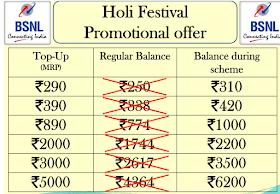
BSNL Latest Offer For You


Bharat Sanchar Nigam Ltd. was incorporated on 15th september 2000 . It took over the business of providing of telecom services and network management from the erstwhile Central Government departments of Telecom Services (DTS) and Telecom Operations (DTO), with effect from 1st October‘ 2000 on going concern basis.It is one of the largest & leading public sector units providing comprehensive range of telecom services in India. 

BSNL has installed Quality Telecom Network in the country & now focusing on improving it, expanding the network, introducing new telecom services with ICT applications in villages & winning customer's confidence. Today, it has about 43.74 million line basic telephone capacity, 8.83 million WLL capacity, 72.60 million GSM capacity, 37,885 fixed exchanges, 68,162 GSM BTSs, 12,071 CDMA Towers, 197 Satellite Stations, 6,86,644 RKm. of OFC, 50,430 RKm. of microwave network connecting 623 districts, 7330 cities/towns & 5.8 lakhs villages .


Most Useful Trick:- पोतना मोबाइल ने हेन्ग थता कइ रिते बचावो! आखो आर्टिकल वांचो


Kaise Aapne Android phone ko hang hone se bachaye -How to solve android mobile hang problem in hindi

FREEDOM 251 बुक कर चुके लोगों के लिए खुशखबरी, किस दिन शुरू होंगी डिलीवरी जानने के लिए.


dosto, Kya aapke Android mobile bahut hang hota he? Kya aapke mobile me ajib ajib ad show hote rahate he? Jiske bajha se aapke mobile slow par jata he To chaliye aaj aap sab ko batate he, Kaise Aapne android mobile ko hang hone se bachaye,,,,

Aaj kal maximum log android mobile use karte he or jadatar log mobile hang ko lekar pareshan he, jiske karan be bar bar apna phone ko reset karte rahate he apne mobile ko hang hone se rokne ke liye. Reset marne ke bad 7-8 din sehi chalta he fir same problem, hang hona start ho jata he. To chaliye aapko kuch tips batate he jinko follow karke aapne mobile ko hang hone se bacha sakte he.

1. Sabse Pahale Aap ulte sidhe application install karna band kar de, jaise ki Anti Virus, Boost up Android phone, battery saver, Cleaning Apps etc. Insab aaps ko install na kare insab aaps ke karan aapka mobile or jada hang karte he, ye sirf nam ka anti virus hote he magar insab aaps ke karan aapke mobile me or virus ate he, or ulte sidhe ads show hote rahate he.

2. Ek sath bahut sare aaps ko run na kare, yehi ek karan he mobile hang hone ka jab bhi aap ek sath 7-8 apps ko run karte he tab apka mobile ka process slow pad jata he or apke mobile hang hone lagta he, isliye jab app use na kar rahe ho to use force stop karde, usko task me se remove kar de.

3. Aapke Mobile me jitne bhi bekar aaps he, jinka koi kam nhi he unsab ko uninstall kar de, kyuki insab apps ke data storage dhire dhire badhte rahate he or aapko pata bhi nhi lagta or aapke mobile ke ram pe dawab padta he jisse apka mobile ka process slow padh jata he jiske karan mobile hang ho jate he, to aap der na kare avi bekar ke aaps ko uninstall kar de.

4. Agar Aapke android mobile ke  Ram or Processor kam he to aap usme heavy  Games bagera install na kare, agar aap heavy Games install karte he to apka mobile uska load nhi le pata he or iske karan apke mobile hang hona start kar deta he.

5. Aapne mobile ke internal storage ko ho sake to khali rakhe usme koi data save na kare, or usme koi apps bagera install na kare, Sab Apps ko apne Extranal  Storage ( Memory Card ) me install kare, 

6. Jitne bhi System Apps he jaise ki ( News and Weather, Google's map, Youtube, Hangouts, fb etc.) agar aapke koi kam nhi ate he to aap un apps ko, Apps Manager me jakar Disable kar de. Jisse aapke android mobile ke ram pe dawab kam padega or aapke phone hang hone se bachega.

7. Aap 3-4 din bad bad aapne mobile ke Apps manager me jakar har apps ka Data clear karte rahe Clear Data button pe click karke, or hamesa apne internet browser jaise Opera, Uc web, Chrome etc. ke cookies, Cache bagera clear karte rahe jisse apka mobile hang hone se bachega.

8. 15-20 Din bad bad apne mobile ko PC se connect karke anti virus se scan karte rahe, jisse apke mobile me agar koi virus hota he to bo remove ho jayega or apka phone virus free rahega.

Agar aapko isse sambhandhit kuch or jankari chahiye to comment karke puch sakte he. Or hamare Facebook page ko like karna na bhule,,,, dhaniyabad


FREEDOM 251 बुक कर चुके लोगों के लिए खुशखबरी, किस दिन शुरू होंगी डिलीवरी जानने के लिए.


Patrika News Network (http://www.patrika.com)

नई दिल्ली। विश्व के सबसे सस्ते मोबाइल के नाम और दाम से प्रचारित हुए Freedom 251 बुक करने वाले के लिए अब एक राहत की खबर आई है। कंपनी के फेसबुक पोस्ट के मुताबिक 30 जून तक लोगों को मोबाइल फोन मिलना शुरू हो जाएगा। कंपनी ने उन लोगों को मैसेज और ईमेल भेजना शुरू कर दिया है जिन्होंने इसकी बुकिंग करवाई थी। गौरतलब है कि फ्रीडम 251 मोबाइल को लेकर अब तक काफी विवाद सामने आ चुके हैं। आखिरकार 30 जून से Freedom 251 delivery शुरू कर दी जाएगी।

Freedom 251 Registration चालू होने के बाद Ringing Bells के मुताबिक इसके लिए 25 लाख तक की एडवांस बुकिंग्स हो चुकी है। इस वजह से कंपनी को 72 करोड़ रूपए की आय हुई। दुनिया के सबसे सस्ते मोबाइल फोन के ट्रेंड और कीमत में संशय की वजह से कंपनी के ऑफिस पर आयकर विभाग द्वारा छापा भी मारा जा चुका है। इसके बावजूद कंपनी का दावा है कि बुक हुए लाखों स्मार्टफोन्स फेज्ड मेनर के तहत सभी ग्राहकों को उपलब्ध करवाए जाएंगें। इसके लिए कंपनी के MD मोहित गोयल ने कहा है कि रिंगिंग बेल्स जल्द ही नोएडा तथा उत्तराखंड में अपने दो मॅन्युफॅक्चरिंग यूनिट्स लगा कर इन हैंडसेट्स का उत्पादन शुरू कर रही है।
Freedom 251 के बाद Ringing Bells SIM दुनिया का सबसे सस्ता Freedom 251 Mobile फोन लॉन्च करने के बाद Ringing Bells SIM Card भी लॉन्च कर रही है। यह मोबाइल फोन सिम कार्ड भी बहुत ही सस्ती दर के साथ उपलब्ध होने के बारे में कहा जा रहा है। इसके अलावा इस SIM Card पर बेहद सस्ती दर पर नेटवर्क भी उपलब्ध कराए जाने की खबर हैं। Freedom 251 Mobile की कीमत को लेकर लोग यूं बने चक्करघिन्नी Freedom 251 Mobile के आने से पहले जहां लोग महंगे Smartphone लेने की सोचते थे वो बदल गई। जैसे ही फ्रीडम 251 की Price का खुलासा हुआ और इस फोन की बुकिंग्स शुरू हुई तो इसे लेने वालों की बाढ़ सी आ गई। हालांकि Freedom 251 Registration महज 251 रूपए में होने को लेकर जनता चक्करघिन्नी बनी रही कि आखिर ऐसा कैसे हो सकता है। हालांकि बाद में रिंगिंग बेल्स के MD मोहित गोयल ने लोगों के प्रत्येक सवाल का जवाब देकर अपने प्रोडक्ट के बारे में आ रही भ्रांतियों को दूर भी किया।

फ्रीडम 251 कीमत सस्ती होने के लिए कंपनी की गणित फोन की कुल कीमत लगभग- 2000 रूपए हैं इनमें निम्न छूट हैं- मेक इन इंडिया में छूट- 400 रूपए ऑल इंडिया बिक्री से बचत- 400 रूपए उत्पाद बढने पर बचत - 400 रूपए इस तरह इस फोन की कुल लागत 800 रूपए आई है, लेकिन कंपनी ने आने वाले समय में इसमें 400 रूपए से ज्यादा और कमी आने के लिए कहा जिससे यह इतना सस्ता हुआ। Freedom 251 Mobile में नहीं धोखा, Ringing Bells ने किया दावा Freedom 251 Mobile फोन यानि दुनिया का सबसे सस्ता स्मार्टफोन Ringing Bells के मुताबिक आपके लिए फायदे का ही सौदा साबित होगा। कंपनी के मुताबिक यह फोन लेने ग्राहकों को इसकी पूरी और समय पर डिलीवरी की जाएगी। यह दावा कंपनी के CEO मोहित गोयल ने करते हुए कहा कि कंपनी बिल्कुल सही कर रही है और अपना वादा निभाएगी। 251 रूपए के Freedom 251 स्मार्टफोन की ये है असली कीमत रिगिंग बेल्स के महज 251 रूपए की कीमत में आए Freedom 251 को दुनिया का सबसे सस्ता 3जी स्मार्टफोन कहा जा रहा है। हालांकि यह बात सही है कि इस फोन की ऑरिजनल कीमत 251 रूपए है, लेकिन आपको यूज में लेते समय तक यह हैंडसेट लगभग 551 रूपए का पड़ेगा। फ्रीडम 251 के लिए कंपनी इसकी कीमत 251 रूपए के अतिरिक्त 40 रूपए का शिपिंग चार्ज ले रही है। इसे मिलाकर इस फोन की कीमत 251+40 यानी 291 रूपए होगी। इसके अलावा इस हैडसेट में 8 जीबी की इंटरनल मेमोरी दी गई है। यदि आप इसकी मेमोरी बढ़ाने के लिए इसमें एक्सटर्नल मेमोरी कार्ड खरीदते हैं तो यह और महंगा हो जाएगा। मार्केट में उपलब्ध सेनडिस्क के 16 जीबी मेमोरी कार्ड की कीमत लगभग 260 रूपए है, जो कि इस फोन की कीमत से भी ज्यादा है। इस तरह 251+40+260 रूपए मिलाकर 551 रूपए होते हैं।
1.Ringing Bells Freedom 251में 4 इंच की क्यूएचडी आईपीएस डिस्पले स्क्रीन दी गई है। 2. बेल्स फ्रीडम 251 Android 5.1 लॉलीपॉप ऑपरेटिंग सिस्टम्म पर काम करता है, जो कि किटकैट से बेहतर है। 3. इस फोन में दो सिम लगती है तथा 3जी नेटवर्क पर काम करता है। हालांकि आजकल 4जी स्मार्टफोन की ज्यादा मांग हो रही है। 4. इस फोन में 1.3 गीगाहर्त्ज क्वॉडकोर प्रोसेसर दिया गया है। एक 3जी स्मार्टफोन के लिए यह बेहतर है। 5. इसमें 1 जीबी रैम दी गई जिसकी वजह से इस प्रदर्शन अच्छा है। इसमें व्हाट्सएप, फेसबुक, ट्विटर आदि एप्स आसानी से चलाए जा सकते हैं। 6. इस फोन में 8 जीबी इंटरनल मेमोरी दी गई है। 


How to Make Your Android Battery Last Longer....


    The more functionality we pack into our smartphones, the more power they need to run. It’s been over a year since J.D. Power surprised no one by revealing that poor battery life has the biggest impact on consumer satisfaction. Running out of juice is still the number one annoyance for smartphone owners. We’re not much closer to long lasting smartphone batteries, because we’re still  reliant on the same old technology
.Image result for mobile battery icon
                  How do you make that battery last? What are the essential tips for saving smartphone battery life that will see you through the day? We’ve already looked at how to maximize your iPhone’s battery life, but in this article we’ll run through some general tips that will work for any smartphone. Then, we’ll take a look at advanced tips, accessories, and apps that could help.

Advanced tips for saving juice

Keep your apps up to date. Developers often release updates for apps and games that offer improved optimization and this can have a big impact on battery life. If you discover a battery hog, then consider removing it. Don’t use task killer apps.
Keep your smartphone as cool as possible. Sitting in direct sunlight on the dashboard of your car will actually drain the battery faster.
Different batteries respond to different charging schedules and they will all eventually degrade. Most smartphones have lithium-ion batteries in them. One thing that many people do which can degrade the battery’s health is to leave it plugged in after it is fully charged. If you’re going to charge your phone overnight, then try to use a charger that shuts off once the battery is full. It’s also best not to let your battery fully discharge too often. Once a month is handy to ensure that calibration is correct (so your phone can tell you accurately how much battery life is left), but in general you want to charge it before it drops too low.

Managing your screen

2013-04-05 16.33.15

As smartphone screens get bigger, the display is responsible for eating more and more of the battery life. On Android you can go into Settings > Battery, or Settings > About phone > Battery use and see exactly what ate your battery. Invariably, your screen will be top of the list.
We’ve already mentioned reducing the brightness level. That will have an impact. You can also decrease the screen timeout. You’ll find it in Settings > Display. Make it as low as you possibly can before you find it terribly frustrating that your screen keeps turning itself off. On Windows Phone you’ll find the option in Settings > Lock + wallpaper > Screen times out after. On BB10 it’s Settings > Display > Screen Lock Timeout.

If you have an AMOLED screen, then you can save battery by using a dark background. The technology turns off pixels when they are black, so if you have predominantly black wallpaper, then you can actually save a lot of juice.

Battery accessories

If you have a device with a removable battery, then you can always buy a spare battery and carry it around with you for emergencies. For some smartphones you can even buy bigger batteries with replacement back covers that accommodate the extra size, but you will inevitably be adding bulk to your device.
You might consider getting a case with a built-in battery. These are specifically designed for certain models, which means that you’ll find plenty for the iPhone, but you might struggle to find one for a less popular phone. For example, Mophie is a popular brand for the iPhone. You’ll also find a good option from PowerSkin for the Z10 in our best BlackBerry Z10 cases roundup. Seidio offer extended battery cases for quite a few smartphone models.
Chargers that fit the lighter socket in your car can be snapped up cheaply. They’re ideal for extending your smartphone battery when you’re on the road, especially if you use your smartphone for navigation.
There are various other accessories worth considering, from pocket batteries, like the Kensington Pocket Battery, to larger solar chargers, like the SunVolt Portable Solar Power Station.

Basic battery saving tips or “turn it off”

 Image result for mobile battery icon

Obviously, the No. 1 battery saving tip for your smartphone, is to turn it off. If you’re in a dead zone, or you need to conserve some battery for later, then you should definitely just turn it off. All of the basic battery saving tips you’ll ever see for smartphones are related to this idea. Maybe you can’t (or don’t want to) turn the device off. In that case, you should turn off some of the functions.
Also, make sure you don’t have Wi-Fi, Bluetooth, GPS, or anything else on when you aren’t using it. Don’t allow push notifications for email updates. Don’t connect to a 4G LTE network when 3G will do. Turn your screen brightness and volume down. Turn vibrations off. Don’t use widgets or animated wallpapers. Whatever you do, don’t play games or watch video.
Of course, no one really wants to hear this. We remember having mobile phones that handled calls and texts and nothing else. The battery life was amazing, comparatively speaking, but who wants to shell out hundreds of dollars for a phone that just enables calls and texts? What’s the point in having a smartphone if you can’t enjoy the features?

What makes sense for you?

It is easy to make battery savings without missing out on the features you love. A lot of people never switch from defaults, even if they find them annoying, but they really should. Turning off vibration and sound feedback for typing is a good example. You may also find that you don’t really need to know every time a vague acquaintance posts something on Facebook or in a Google+ group that you’re part of. A lot of apps have push notifications on by default and they eat a huge amount of battery juice. They can also constantly distract you with inconsequential nonsense.
Location tracking is another feature that is often left on, even although the smartphone owner is not using it. Watch out for apps that want to know your location. If you’re not actually using the smartphone for navigation right now, then there’s very little benefit to allowing location tracking.
It doesn’t have to be a major chore. Many smartphones come with quick settings menus that allow you to turn off features with a tap when you don’t need them. If yours doesn’t, then you’ll be able to find an app that offers this functionality. Windows Phone actually has a built-in Battery saver feature which you’ll find in Settings.

Rooting on Android

One thing worth mentioning briefly is the options that rooting opens up for Android owners intent on improving battery life. It definitely falls under the advanced category, but you can underclock your CPU and freeze annoying bloatware apps. Check out how to root your Android for more on that.

Battery saving apps

You’ll find various battery saving apps on all the major platforms. Some of the best options can help you identify what is eating your battery and allow you to save juice without having to dig into individual features and do a lot of manual tweaking.
The most popular option for Android is Juice Defender. It’s completely free and you can choose preset profiles, so there’s no need to get your hands dirty, unless you want to. Android gives apps more power to influence your battery drain than other platforms, but you can still use apps on other platforms to gain an insight and find more tips.
On iOS, the free Battery Doctor app provides useful insights and reminders. For Windows Phone 8, there’s a popular app called Battery, which displays how much battery life you have left and gives you access to quick settings. Battery Lover is a very similar app for BlackBerry 10.

More smartphone battery saving tips

That’s all folks, but we’re always on the lookout for more tips to save smartphone battery life, so post a comment and share if you have a good suggestion. We’d also love to hear about any power-saving accessories you might have discovered that work well for you.